RAG Database Efficiency: Practical Guide for Small Business AI
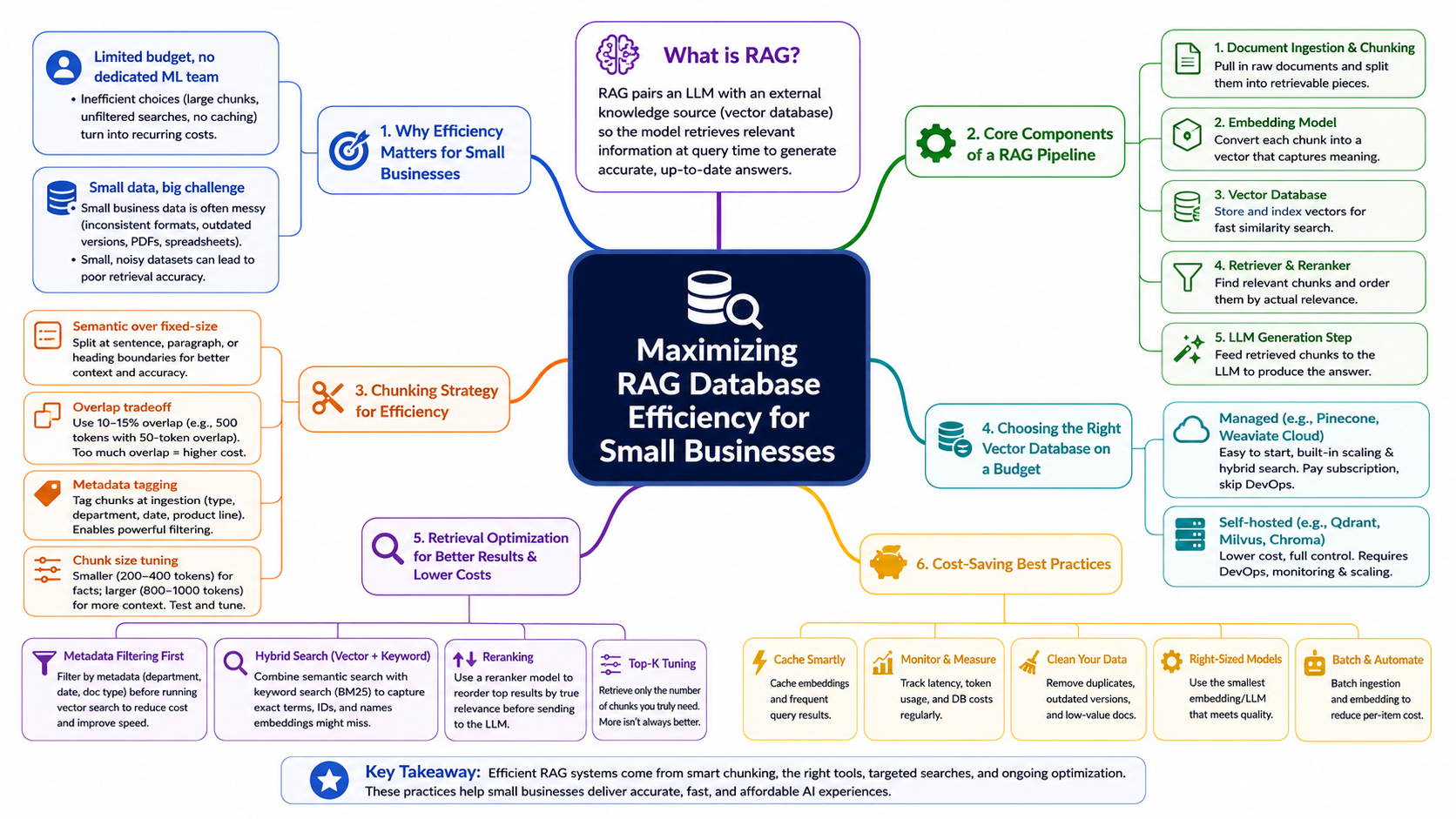
How Small Businesses Can Maximize RAG Database Efficiency
Introduction
Retrieval augmented generation (RAG) has been sold as the answer to almost every business AI problem: plug your documents into a vector database, connect it to an LLM, and suddenly you have a chatbot that knows everything about your company. The reality for most small businesses looks a little different. You get a working prototype in a week, then spend the next three months fighting slow queries, irrelevant answers, and a vector database bill that keeps climbing no matter how few users you have.
None of that means RAG is a bad fit for small business AI. It means the gap between "RAG demo" and "efficient RAG database" is wider than most tutorials let on. This guide walks through what actually goes into a lean, cost-conscious RAG database, and how to build one without a dedicated machine learning team or an enterprise infrastructure budget.
What Is RAG?
Retrieval augmented generation is an architecture that pairs a language model with an external knowledge source, usually a vector database, so the model can pull in relevant information at the moment it answers a question instead of relying only on what it learned during training. Instead of fine-tuning a model on your company data (expensive, slow to update), you store your documents as searchable vectors and retrieve the most relevant pieces at query time.
If you're new to how prompts and retrieved context work together inside an LLM call, our guide to prompt engineering covers the fundamentals that make RAG systems reliable in the first place.
Why Efficiency Matters for Small Business Specifically
Large companies can absorb an inefficient RAG database. They have engineering headcount to tune it and budget to cover the wasted compute. Small businesses don't get that cushion, and two factors make the problem sharper than it looks on paper.
Limited budget, no dedicated ML team: Most small business RAG projects are built by a generalist developer or an outside contractor, then left to run with minimal ongoing tuning. Every inefficient design decision, oversized chunks, unfiltered searches, no caching, turns into a recurring cost that nobody is actively watching.
Small data doesn't mean a small problem: A small business might only have a few hundred documents, but that data is often messier than a large enterprise's: inconsistent formatting, scanned PDFs, outdated policy versions sitting next to current ones, spreadsheets exported as plain text. A small, noisy dataset can produce worse retrieval accuracy than a much larger, well-structured one, so efficiency work has to start with the data itself, not just the infrastructure around it.
Core Components of a RAG Pipeline
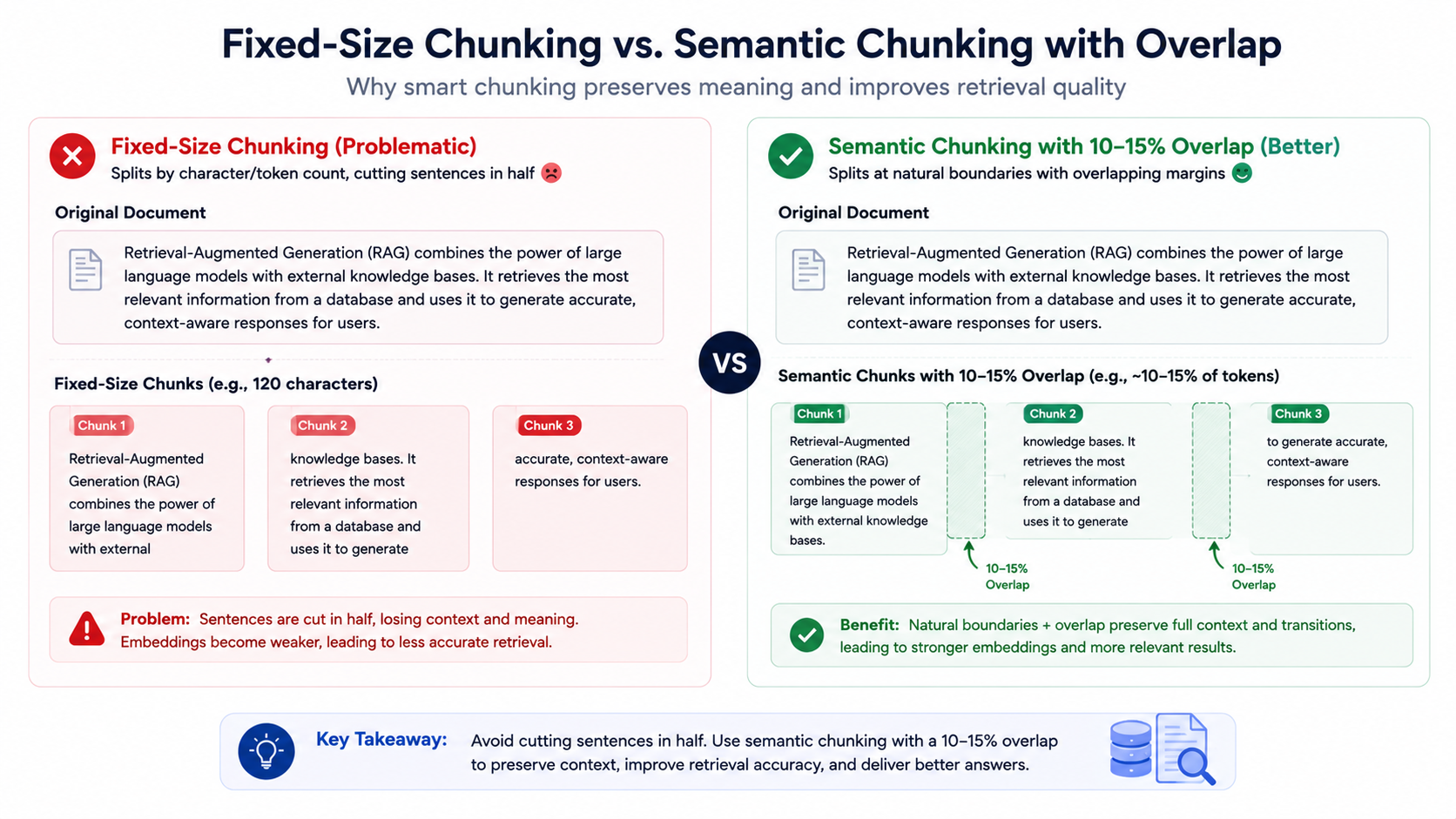
Before optimizing anything, it helps to see the full pipeline as five distinct stages. Each one is a separate point where cost and accuracy get decided.
- Document ingestion and chunking: pulling in raw source documents and splitting them into retrievable pieces.
- Embedding model: converting each chunk into a numerical vector that captures its meaning.
- Vector database: storing and indexing those vectors so they can be searched quickly.
- Retriever and reranker: finding the most relevant chunks for a given query and ordering them by actual relevance.
- LLM generation step: feeding the retrieved chunks to the language model to produce a final answer.
A weak link at any one of these stages drags down the whole system, which is why the sections below go through each one individually.
Chunking Strategy for Efficiency
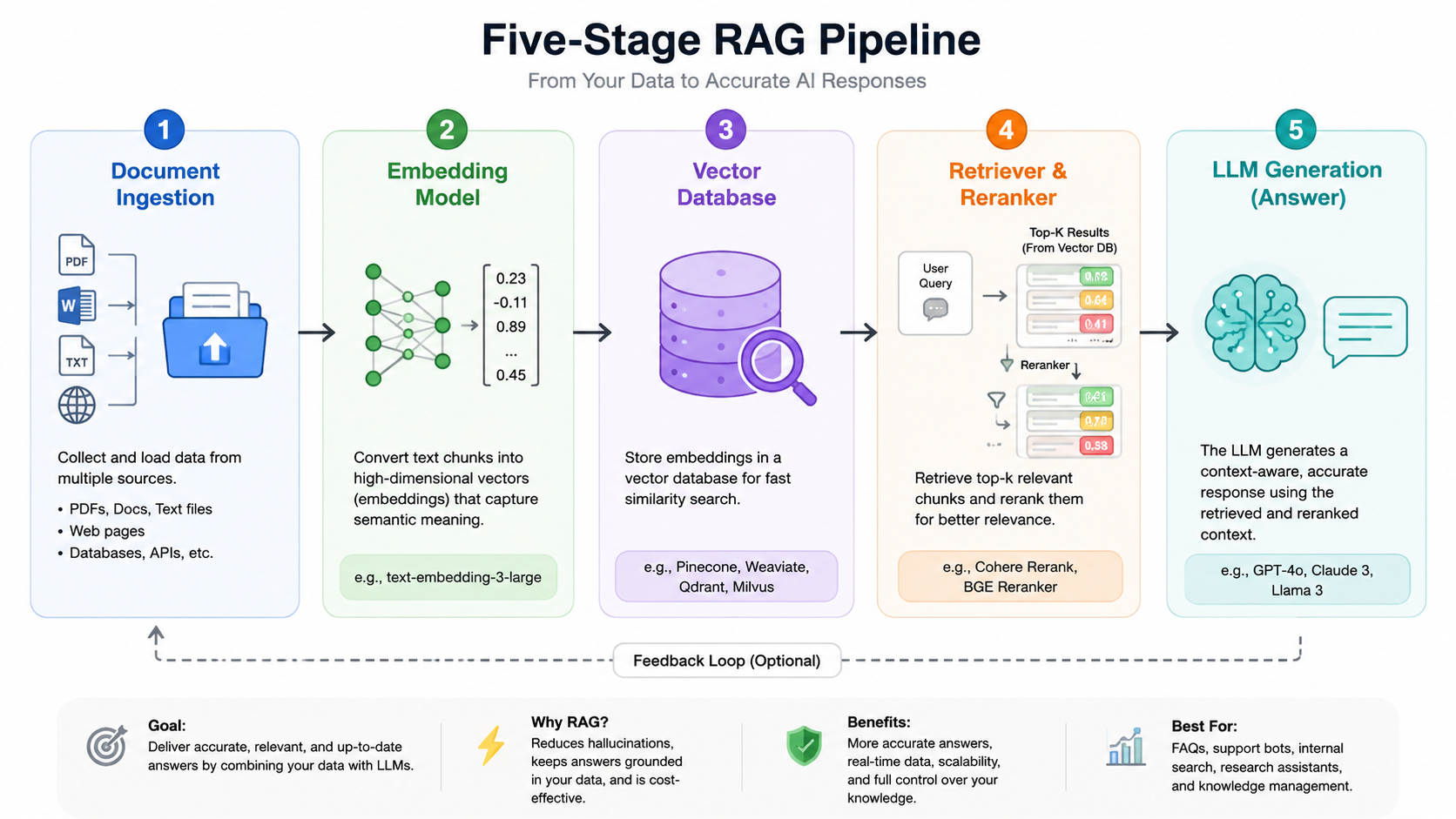
Chunking is where most RAG database inefficiency starts. Split documents at fixed character counts and you'll regularly cut a paragraph, a table row, or a policy clause in half, which weakens the embedding generated from that chunk and hurts retrieval accuracy downstream.
Fixed-size vs. semantic chunking: Fixed-size chunking is simple to implement but ignores document structure. Semantic chunking, splitting at sentence, paragraph, or heading boundaries, keeps each chunk conceptually complete and tends to produce noticeably better search results, especially for policy documents and product documentation.
The overlap tradeoff: Adding a small overlap between chunks (commonly 10-15%, e.g. 500-token chunks with a 50-token overlap) prevents transition sentences from being lost at chunk boundaries. Too much overlap, though, bloats your vector database with redundant content and drives up storage and query costs. Overlap is a tuning knob, not a "more is better" setting.
Metadata tagging: Tag each chunk with structured metadata at ingestion time (document type, department, date, product line). This costs almost nothing to set up and pays off directly in the retrieval optimization section below, since it lets you filter the search space before running a vector query.
Choosing the Right Vector Database on a Budget
Vector database choice is one of the biggest cost levers in a RAG database. Broadly, you're choosing between managed cloud services and self-hosted open-source options.
Managed vector databases like Pinecone and Weaviate Cloud handle infrastructure, scaling, and hybrid search support for you. You pay a subscription, but you skip the DevOps overhead of running your own database.
Self-hosted vector databases like Chroma and Qdrant, or the pgvector extension for an existing PostgreSQL instance, cost less on an ongoing basis if you already have infrastructure and someone comfortable maintaining it.
| Vector Database | Type | Typical Cost for Small Biz | Hybrid Search | Self-Host Effort |
|---|---|---|---|---|
| Pinecone | Managed | Paid (usage-based tiers) | Yes | None |
| Weaviate Cloud | Managed | Paid (usage-based tiers) | Yes | None |
| Qdrant | Self-hosted or managed | Free (self-hosted) | Yes | Low-Moderate |
| Chroma | Self-hosted | Free (open source) | Limited | Low |
| pgvector (Postgres) | Self-hosted | Free (uses existing DB) | Via extensions | Low if Postgres already in use |
For a small business already running PostgreSQL, pgvector is often the cheapest entry point into RAG database optimization since it avoids standing up a separate system entirely.
Embedding Model Selection
The embedding model determines how well your chunks are represented as searchable vectors, and it's a cost decision as much as an accuracy one.
Small/cheap vs. large embedding models: Larger, higher-dimensional embedding models can capture more nuance but cost more per query and add storage overhead. For most small business knowledge bases, a smaller or mid-tier embedding model performs close enough to the largest models to not justify the added cost, especially once hybrid search and reranking are layered on top.
Local vs. API-based embeddings: API-based embedding models (OpenAI, Cohere, etc.) are easy to integrate and require no infrastructure, but costs scale with document volume and query frequency. Local, open-source embedding models running on your own hardware remove the per-call cost but require compute resources and some setup work. If you're re-indexing large document sets frequently, local embedding can be meaningfully cheaper over time.
Retrieval Optimization Techniques
Once documents are chunked and embedded, the next layer of efficiency comes from how you search the index.
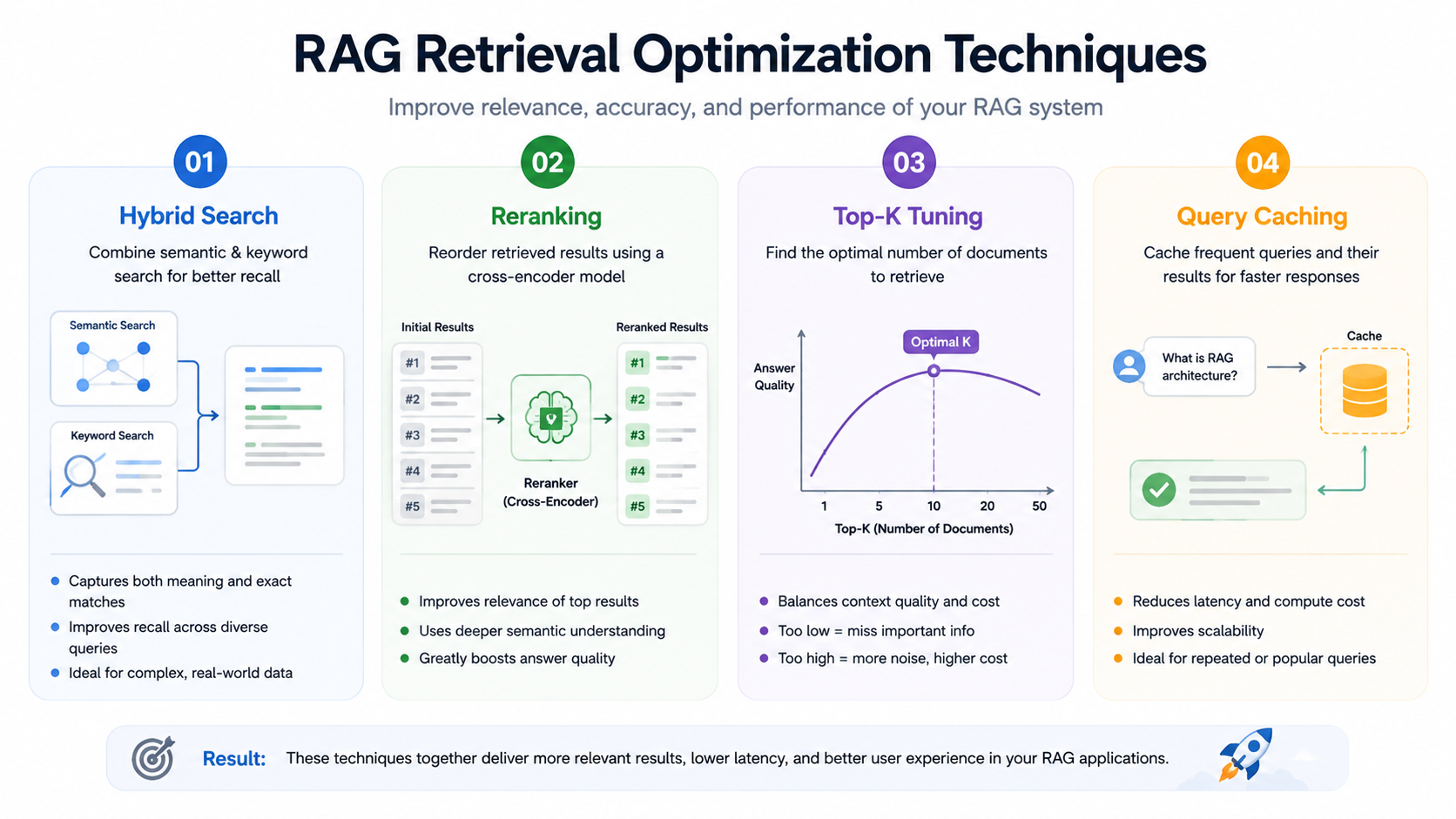
Hybrid search. Pure vector search misses exact matches, product IDs, SKUs, legal terms, that embedding models don't represent well. Combining vector search with keyword search (BM25) catches both conceptual and exact-match queries.
Reranking: Initial retrieval returns a broad candidate set based on similarity score, which isn't always the same as relevance. A lightweight reranking step re-scores that candidate set against the specific query before it's sent to the LLM, improving the accuracy of the final context.
Top-k tuning: Retrieving too many chunks per query wastes LLM context and money; retrieving too few risks missing the answer. Testing different top-k values (commonly between 3 and 10) against real queries is worth the time, since the right number varies by use case.
Caching frequent queries: Small business chatbots often see the same handful of questions repeatedly (shipping policy, pricing, return windows). A semantic cache, matching new queries against previously cached ones by similarity rather than exact text, cuts both latency and API cost on repeat traffic.
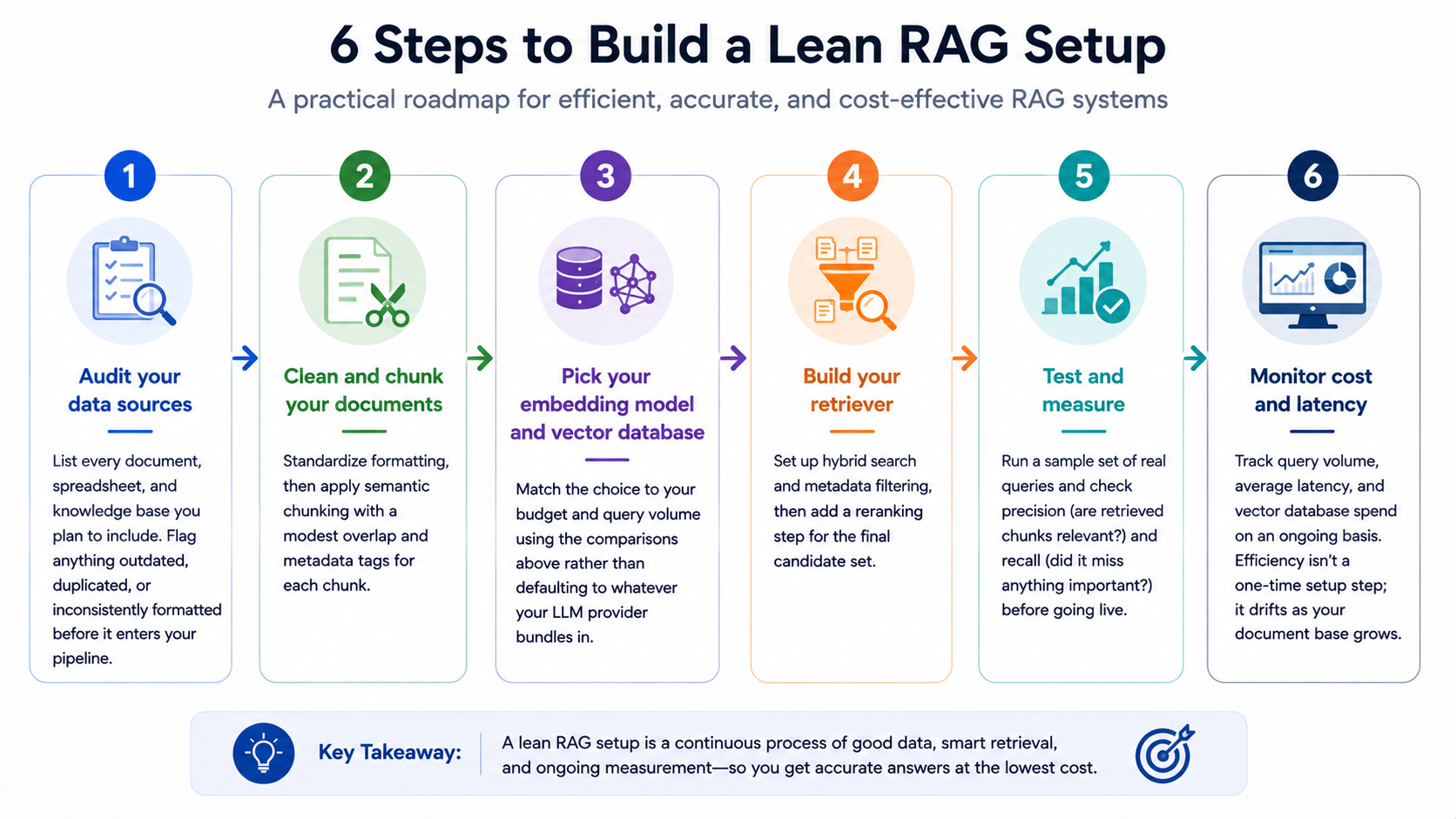
Step-by-Step: Build a Lean RAG Setup
- Audit your data sources: List every document, spreadsheet, and knowledge base you plan to include. Flag anything outdated, duplicated, or inconsistently formatted before it enters your pipeline.
- Clean and chunk your documents: Standardize formatting, then apply semantic chunking with a modest overlap and metadata tags for each chunk.
- Pick your embedding model and vector database: Match the choice to your budget and query volume using the comparisons above rather than defaulting to whatever your LLM provider bundles in.
- Build your retriever: Set up hybrid search and metadata filtering, then add a reranking step for the final candidate set.
- Test and measure: Run a sample set of real queries and check precision (are retrieved chunks relevant?) and recall (did it miss anything important?) before going live.
- Monitor cost and latency: Track query volume, average latency, and vector database spend on an ongoing basis. Efficiency isn't a one-time setup step, it drifts as your document base grows.
Common Mistakes Small Businesses Make
- Over-chunking or under-chunking: Chunks that are too small lose context; chunks that are too large dilute relevance and waste tokens. Neither extreme retrieves well.
- No evaluation metric: Shipping a RAG chatbot without ever testing precision or recall means you won't notice when retrieval quality degrades until customers start complaining.
- Ignoring the update and refresh cycle: Documents change. Without a plan for re-indexing updated content, your RAG database quietly serves outdated answers alongside current ones.
Cost-Saving Tips Recap
- Use semantic chunking with modest overlap (10-15%) instead of oversized fixed chunks.
- Tag chunks with metadata and filter before searching, not after.
- Choose a self-hosted vector database like Qdrant, Chroma, or pgvector if you already have infrastructure to run it.
- Start with a smaller embedding model and only upgrade if testing shows a real accuracy gap.
- Add hybrid search and reranking before assuming you need a bigger model.
- Cache frequent or repeated queries with a semantic cache.
- Set a top-k value based on testing, not a default guess.
Tools Comparison: Open-Source vs. Paid
| Tool Category | Open-Source Option | Paid/Managed Option | Best For |
|---|---|---|---|
| Vector Database | Qdrant, Chroma, pgvector | Pinecone, Weaviate Cloud | Open-source: budget-first teams with infra capacity. Paid: teams wanting zero DevOps overhead |
| Embedding Model | Sentence-Transformers (local) | OpenAI, Cohere embeddings | Open-source: high query volume, cost control. Paid: fast setup, no infra |
| Reranker | Open-source cross-encoders | Cohere Rerank, managed reranking APIs | Open-source: full control. Paid: simpler integration |
| Orchestration | LangChain, LlamaIndex (self-hosted) | Managed RAG platforms | Open-source: custom pipelines. Paid: faster time to launch |
Frequently Asked Questions
What is the cheapest vector database for a small business?
Self-hosted options are generally the cheapest since you avoid subscription fees. pgvector is often the lowest-cost entry point if you already run PostgreSQL, since it doesn't require standing up a separate database. Chroma and Qdrant are also free to self-host if you have the infrastructure to run them.
How much data do I need for RAG to work well?
There's no fixed minimum. RAG can work with a few hundred well-structured documents just as well as thousands of messy ones. Data quality, clean formatting, clear chunking, accurate metadata, matters more than raw document count.
RAG vs. fine-tuning: which is cheaper?
RAG is almost always cheaper for small businesses. Fine-tuning requires machine learning expertise, compute resources for training, and retraining every time your data changes. RAG only requires embedding and indexing new documents, which is far less resource-intensive and doesn't require specialized ML skills to maintain.
Conclusion
An efficient RAG database isn't about picking the fanciest vector database or the largest embedding model, it's about making deliberate choices at every stage of the pipeline: how you chunk documents, how you search them, and how closely you watch cost and performance after launch. Small businesses that get chunking, metadata filtering, and vector database selection right can run a RAG system with retrieval accuracy that competes with far larger, more expensive deployments.
If you're planning a RAG-based AI chatbot or internal knowledge assistant and want a second opinion on your architecture before you build, get in touch with our team for a walkthrough of your specific data and budget constraints.