Loop Prompting: How Iterative Prompt Engineering Boosts AI Output Quality
What Is Loop Prompting in Prompt Engineering?
Introduction
Ask an LLM a complex question once and you'll usually get a reasonable answer. Ask it to solve a genuinely hard problem, debug a tricky piece of logic, write a nuanced analysis, plan a multi-step task, and a single-shot prompt often falls short. The model commits to an answer on the first pass, with no chance to catch its own mistakes or revise based on feedback. This is where prompt engineering runs into a wall if you stop at writing one good prompt and calling it done.
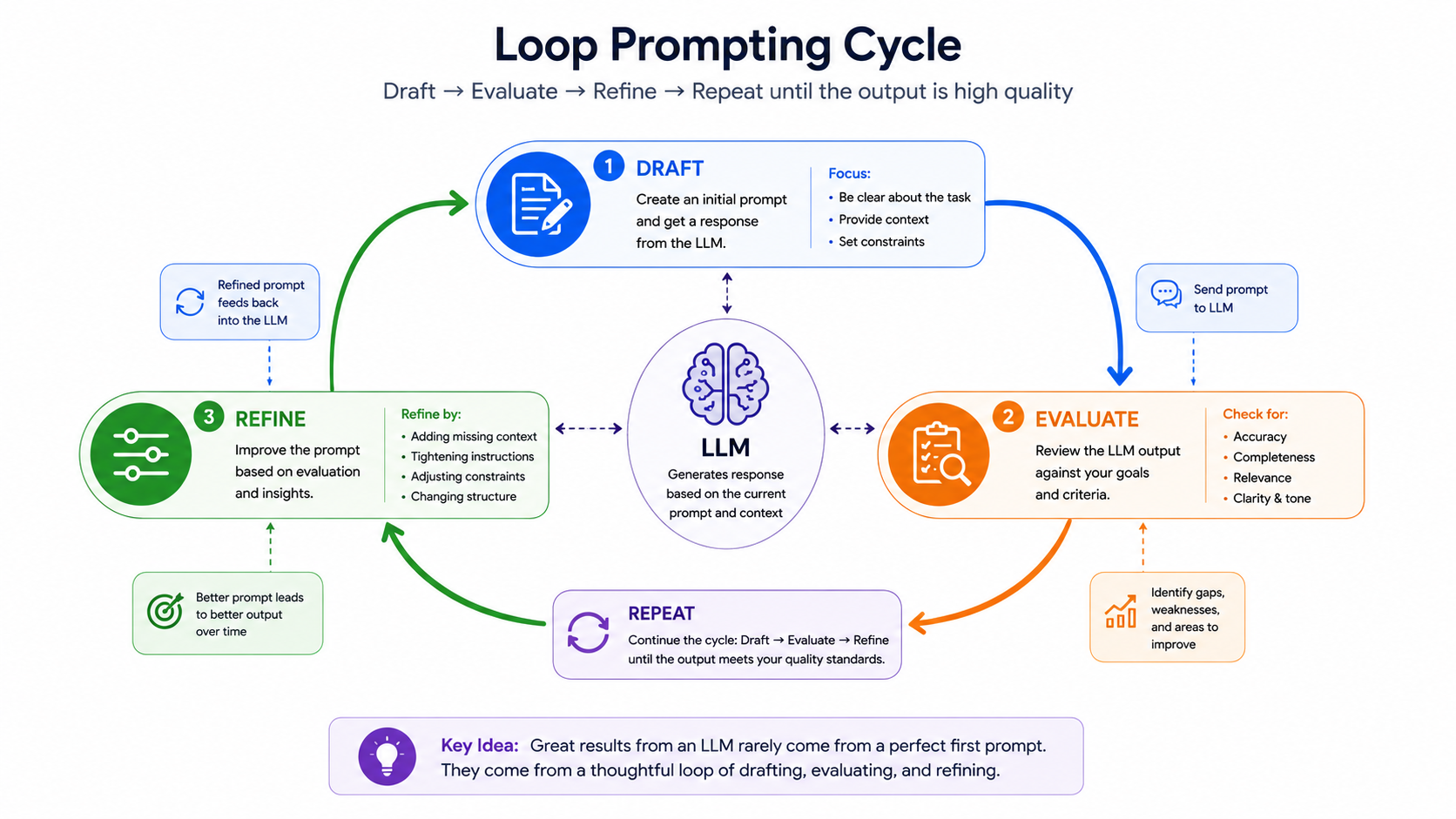
Loop prompting fixes this by turning a single request into a cycle: draft, evaluate, refine, repeat. Instead of hoping the first response is right, you build a structured loop that lets the model, or a human, check the output against a standard and improve it before it's treated as final. It's a simple shift in approach, but it consistently produces more accurate, more complete, and more reliable results on tasks that a single prompt struggles with.
What Is Prompt Engineering?
Prompt engineering is the practice of designing and structuring the instructions you give an LLM to get consistent, accurate, and useful output. It covers everything from word choice and examples to formatting, role instructions, and how you break a task into steps. Anthropic's own prompt engineering documentation is a solid reference if you want to go deeper into the foundational techniques that loop prompting builds on top of.
Loop prompting isn't a replacement for good prompt engineering, it's an extension of it. A well-written prompt is still the starting point of any loop; the loop just gives you a mechanism for catching and fixing what that first prompt gets wrong.
What Is "Looping" in an AI Context?
Looping means feeding a model's output back into the process, either to itself or to another step, so it gets evaluated and improved before you accept it as final. In practice, this shows up as a few distinct patterns.
Iterative refinement loop: The model produces a draft, then is prompted again to improve that specific draft against a stated goal. Each pass narrows the gap between the current output and the target quality.
Self-critique loop: The model is asked to evaluate its own output against explicit criteria, identify weaknesses, and then revise. This works because critiquing an existing answer is often an easier task for an LLM than generating a perfect answer from scratch.
Feedback loop (human-in-the-loop vs. automated): Some loops involve a person reviewing output and providing correction at each step (human-in-the-loop), while others run the evaluation and revision entirely through automated prompts with no human intervention until a final check. Automated loops scale better; human-in-the-loop loops tend to produce higher-trust results for high-stakes tasks.
Why Loop Prompting Matters
Looping isn't just a nice-to-have technique, it directly addresses the biggest weaknesses of single-shot prompting.
- Higher accuracy: Giving a model the chance to check its own work against criteria catches errors that would otherwise ship straight through to the final answer.
- Error correction: Loops create a built-in mechanism for identifying and fixing mistakes, factual errors, logical gaps, incomplete instructions, before the output reaches a user.
- Complex task breakdown: Multi-step tasks (research, coding, analysis) rarely fit cleanly into one prompt. Looping lets you break a large task into smaller, checkable stages instead of asking for a perfect result in one shot.
Types of Loop Prompting Techniques
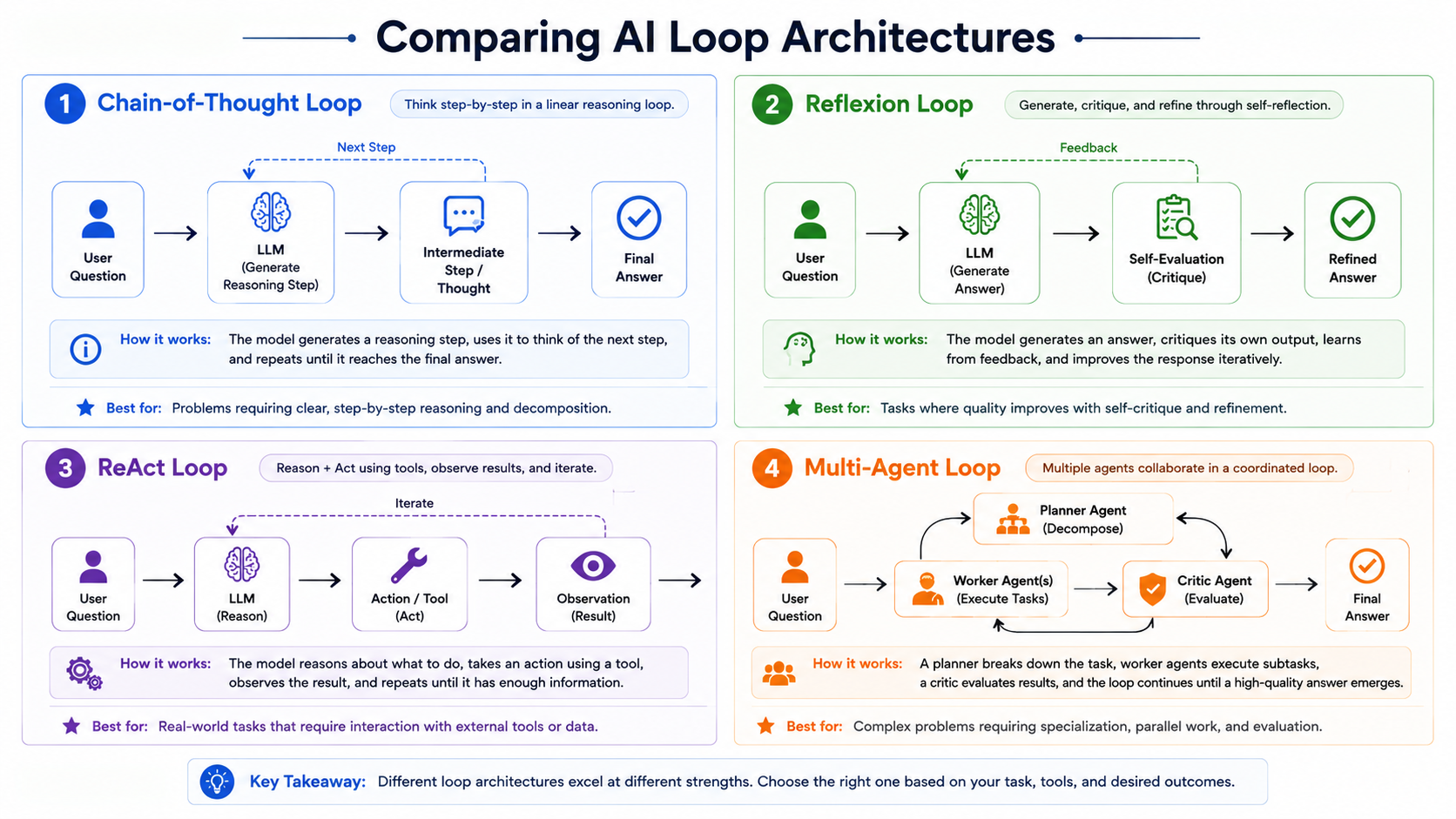
Loop prompting isn't a single technique, it's a category. A few specific patterns show up repeatedly in production LLM applications.
Chain-of-thought loop: The model reasons through a problem step by step, then loops back over its own reasoning chain to check for logical errors before committing to a final answer. This is closely related to standard chain-of-thought prompting, but with an added review pass.
Reflexion / self-critique loop: Named after the "Reflexion" approach in LLM research, this pattern has the model generate an answer, critique it against explicit criteria, and revise, sometimes across multiple rounds, until the self-critique stops finding meaningful issues.
ReAct (reason + act loop): The model alternates between reasoning about what to do next and taking an action (like calling a tool or searching for information), looping through reason-act-observe cycles until the task is complete. This pattern is common in agentic workflows where the model needs to interact with external tools or data.
Multi-agent loop: Instead of one model looping on its own output, multiple model instances (or roles) pass work back and forth, one drafts, another critiques, a third finalizes. This distributes the loop across separate "agents" with different instructions, which can produce more objective critique than a single model reviewing its own work.
Loop Prompting vs. Chain Prompting at a Glance
| Loop Prompting | Chain Prompting | |
|---|---|---|
| Structure | Cyclical: draft, evaluate, refine, repeat | Linear: one prompt's output feeds the next, no repetition |
| Goal | Improve a single output through repeated revision | Break a task into ordered sub-tasks |
| Stop condition | Needs an explicit rule (max iterations or quality threshold) | Ends when the last step in the sequence completes |
| Best for | Tasks needing accuracy checks: code, analysis, complex writing | Tasks with clear sequential stages: research → outline → draft |
| Cost pattern | Scales with number of iterations | Scales with number of chain steps, run once each |
How to Build a Loop Prompt
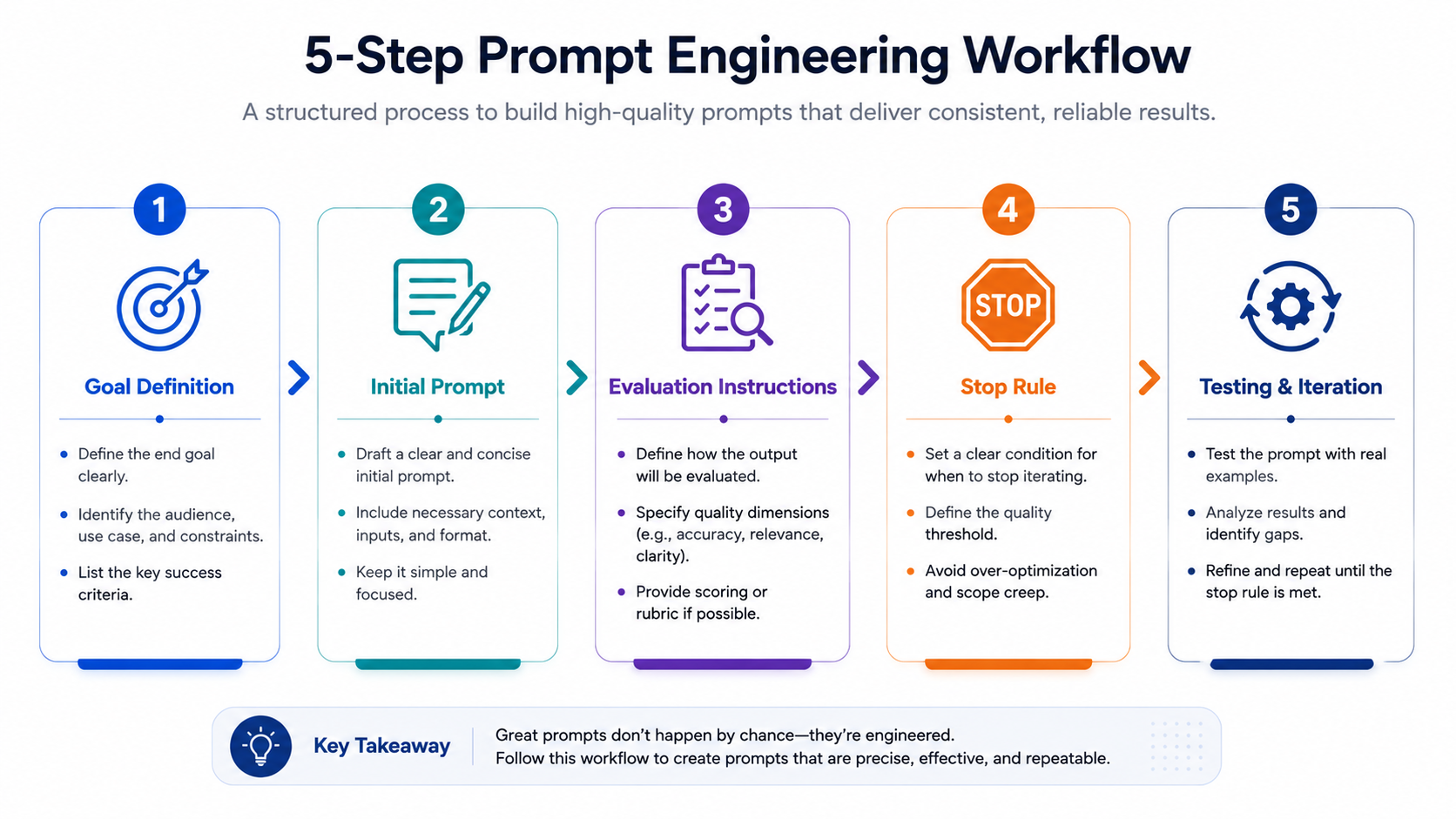
- Define the goal and success criteria: Before writing anything, decide exactly what "done" looks like. Vague goals produce vague loops; be specific about what the final output needs to include or avoid.
- Draft the initial prompt: Write a clear first-pass prompt using standard prompt engineering principles, clarity, examples, and explicit instructions.
- Add evaluation instructions: Write a second prompt (or a second instruction within the same prompt) that asks the model to check its own output against the success criteria from step 1 and flag specific weaknesses.
- Set a loop condition (stop rule): Decide how the loop ends: a fixed number of iterations, a quality threshold, or a check for "no further issues found." Without this, loops either stop too early or never stop at all.
- Test and iterate: Run the loop on real examples, check whether the final output is actually better than the single-shot version, and adjust your evaluation criteria if the loop isn't catching the errors you expected.
Real Example
Here's a simplified loop prompting pattern you can adapt directly:
Step 1 (Draft):
"Write a product description for [product]. Requirements: 150 words,
persuasive tone, mention 3 key features, no exaggerated claims."

Step 2 (Self-critique):
"Review the draft above against these requirements: word count,
tone, feature coverage, factual accuracy. List any requirement
that was not fully met."

Step 3 (Revise):
"Rewrite the draft to fix every issue listed in the critique above.
Keep everything else unchanged."

Step 4 (Stop rule):
"If the critique in Step 2 finds no unmet requirements, stop and
return the current draft as final. Otherwise repeat Steps 2-3,
up to a maximum of 3 revision cycles."
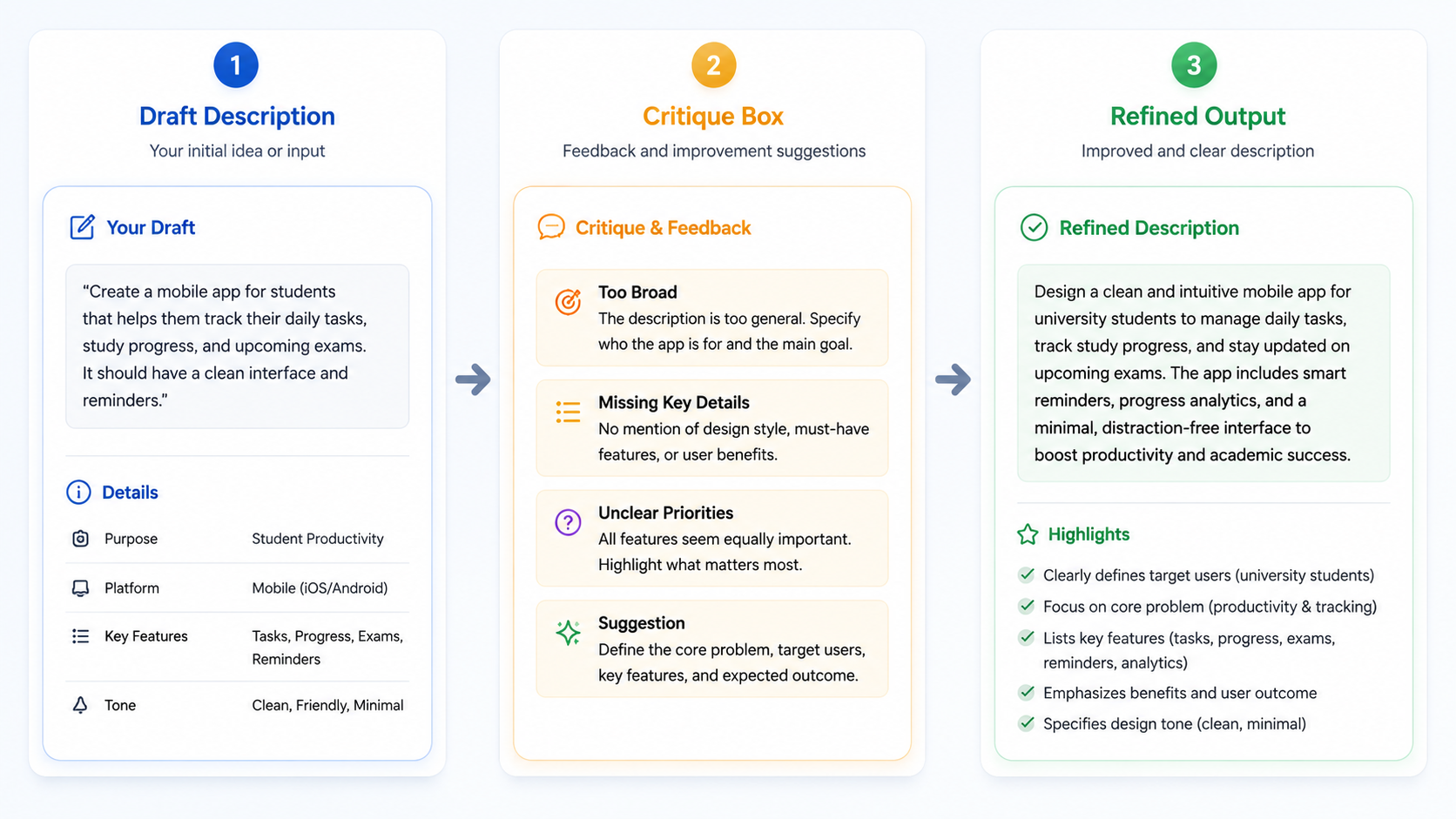
This four-step structure works for far more than product descriptions, the same pattern applies to code review loops, analysis writing, and customer support response drafting, just swap the success criteria in Step 1.
Common Mistakes to Avoid
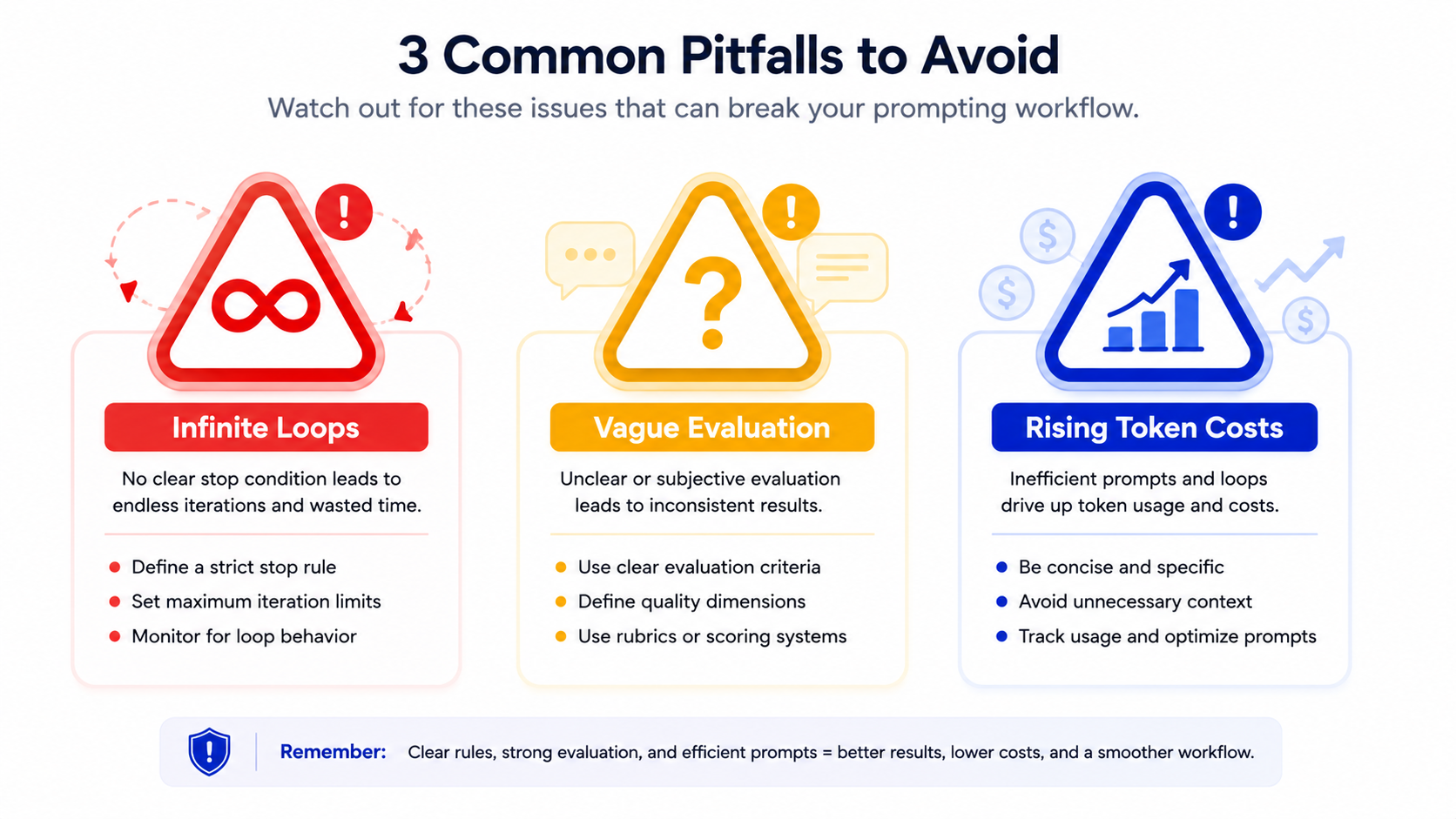
- Infinite loops with no exit condition: Without a defined stop rule, a loop can run indefinitely (or until it hits an API limit), burning cost with no guarantee of a better result. Always define a maximum iteration count or a clear stopping condition.
- Vague evaluation criteria: If Step 2 in your loop doesn't have specific, checkable criteria, the self-critique step becomes a rubber stamp that approves everything. Vague criteria produce vague loops.
- Token cost blow-up: Every iteration of a loop adds tokens, and therefore cost and latency. A three-round loop on a long document can cost several times more than a single-shot prompt. Test whether the accuracy gain actually justifies the added cost for your specific use case before deploying a loop in production.
Tools That Support Loop Prompting
Several platforms make it easier to build and run loop prompting workflows without hand-coding every step:
- Claude supports multi-turn conversations and tool use natively, which makes it straightforward to build iterative refinement and ReAct-style loops directly through the API.
- LangChain provides orchestration primitives (chains, agents, memory) specifically designed for building multi-step and looped LLM workflows.
- AutoGPT-style frameworks automate the reason-act-observe loop for agentic tasks, running iterative cycles with minimal manual intervention, though they require careful stop-condition design to avoid runaway loops.
Frequently Asked Questions
What is loop prompting?
Loop prompting is a prompt engineering technique where a model's output is fed back into an evaluation and revision cycle, draft, critique, refine, instead of accepting the first response as final. It's used to improve accuracy and catch errors on complex tasks that single-shot prompting handles poorly.
What's the difference between loop prompting and chain prompting?
Prompt chaining runs a fixed sequence of prompts in one direction, each step feeds the next, with no repetition. Loop prompting specifically involves repetition: the same evaluation and revision cycle runs multiple times until a stop condition is met. Chaining is linear; looping is cyclical.
Is loop prompting expensive?
It costs more than single-shot prompting because each iteration adds tokens, but it's not automatically expensive. Cost depends on how many iterations you allow and how long each prompt is. Setting a low maximum iteration count and specific evaluation criteria keeps costs predictable while still capturing most of the accuracy benefit.
Conclusion
Loop prompting won't fix a badly written prompt, but it will catch and correct the errors that even a well-written prompt lets through on the first try. For any task where accuracy matters more than speed, complex analysis, code generation, multi-step reasoning, adding a draft-evaluate-refine cycle to your prompt engineering approach is one of the more reliable ways to raise output quality without switching models or increasing prompt complexity in a single shot.
If you're building an AI workflow that needs this level of reliability and want help designing the right loop structure for your use case, get in touch with our team to talk through your specific requirements.